
Which Printer Is Number One
There is no single printer that holds the number one spot for every job. The best printing solution depends entirely on what you need to print, how fast you need it, and the level of quality your project demands. A home inkjet that handles school reports falls short when you need a full-color banner or a professional sign for your storefront.
That distinction matters more than most people realize. Choosing the wrong printer or print method wastes time, money, and materials. For anyone without access to a printer, or anyone whose project exceeds what a desktop machine can handle, understanding the real options available makes the difference between a frustrating experience and a finished product you can rely on.
This guide breaks down printer types, professional print services, file preparation basics, and local printing options in Dallas, TX. Whether you need a single document, a batch of posters, or a custom outdoor sign, you will know exactly which solution ranks number one for your specific situation.
Why "Number One Printer" Depends on What You Need to Print
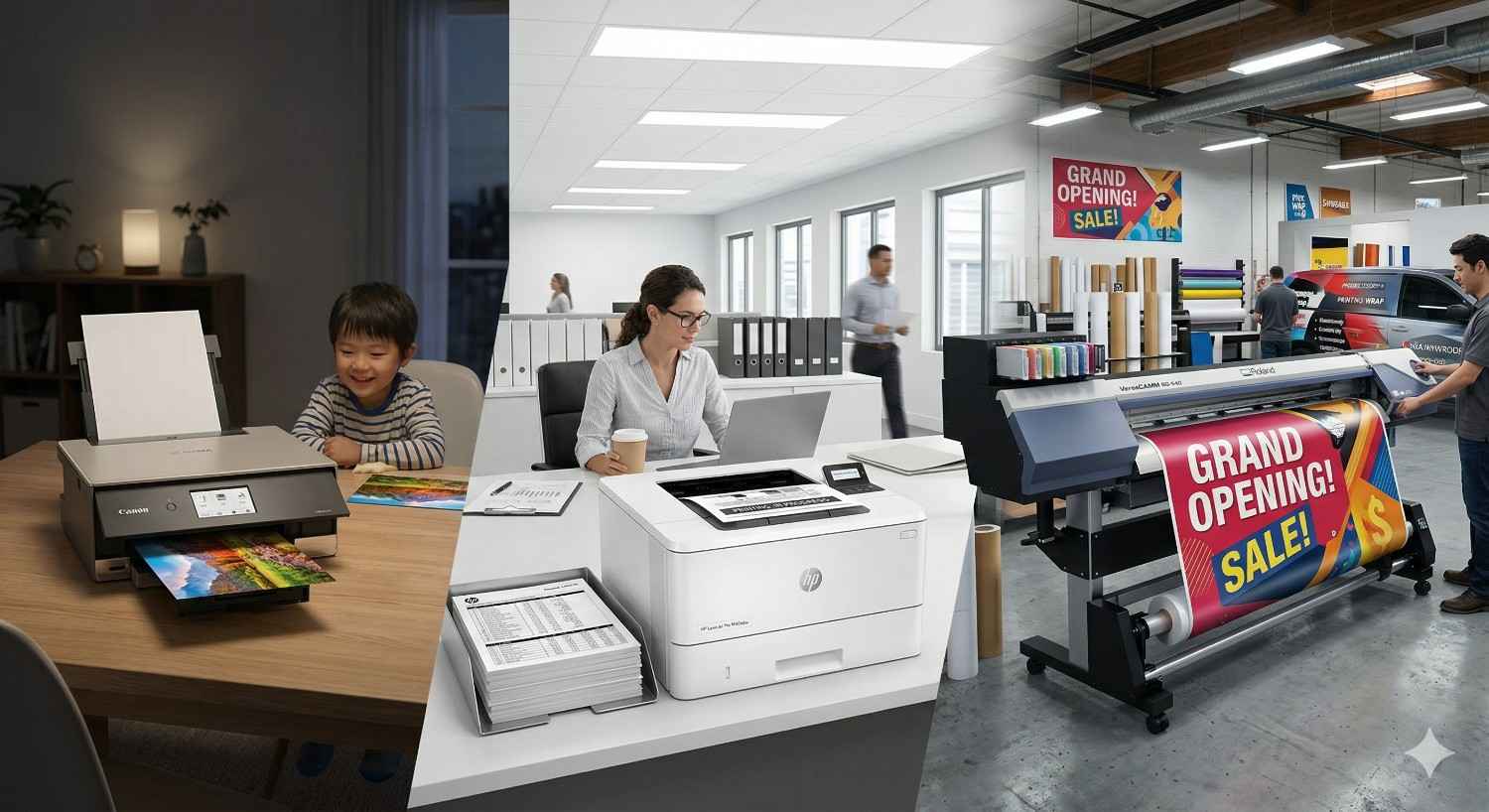
The phrase "number one printer" gets searched thousands of times each month. But the honest answer is that no single machine or service wins across every category. A laser printer dominates black-and-white document speed. A wide-format inkjet excels at vivid poster color. A commercial print shop with industrial presses produces signage that no consumer device can match.
The right question is not "which printer is number one?" It is "which printing solution is number one for my project?" Once you frame it that way, the answer becomes clear and actionable.
Document Printing for Everyday Needs
Standard documents like reports, contracts, flyers, and presentations require clean text, consistent margins, and reliable output. For low-volume personal use, a monochrome laser printer handles this well. Models from brands like HP, Brother, and Canon consistently rank at the top of consumer reviews for speed and cost per page.
But if you do not own a printer, or you need a higher volume than your home machine can handle, a professional print shop produces the same documents faster and often at a lower effective cost. You skip the upfront investment in hardware, toner, and maintenance. You walk in with a file, and you walk out with finished prints.
Poster and Large-Format Printing
Posters, banners, blueprints, and presentation boards require wide-format capability that consumer printers simply do not offer. Standard home printers max out at 8.5 x 11 inches or 11 x 17 inches at best. Anything larger demands a dedicated wide-format printer, which can cost thousands of dollars and requires specialized ink and media.
For most people, a professional large-format print service is the clear number one choice. Commercial wide-format printers produce output up to 44 inches wide or larger, with vibrant color accuracy and sharp resolution on materials ranging from glossy photo paper to vinyl and canvas.
Custom Signs and Business Graphics
Signage is an entirely different category. Custom signs, vehicle wraps, window graphics, trade show displays, and outdoor banners require not just large-format printing but also specialized materials, laminates, and finishing techniques. No consumer printer handles this.
The number one solution for signage is always a professional sign and print company with the right equipment, material inventory, and production expertise. This is where the gap between a home printer and a commercial provider becomes most obvious.
Types of Printers and Print Services Ranked by Use Case
Understanding the core printer categories helps you match the right tool to the right job. Here is how the main types compare.
Inkjet vs. Laser vs. Commercial-Grade Printers
Inkjet printers from Epson, Canon, and HP lead consumer rankings for photo and color output. Laser printers from Brother, HP, and Lexmark dominate for office document speed. But neither category competes with the output quality, size range, and material versatility of commercial-grade equipment found at professional print shops.
Home Printers vs. Professional Print Shops
A home printer makes sense if you print regularly, need only standard paper sizes, and can manage ink or toner costs. For occasional printing, infrequent use, or anything beyond letter-size paper, a professional print service is almost always more practical and cost-effective.
Home printers also carry hidden costs. Ink cartridges dry out if unused for weeks. Print heads clog. Paper jams waste time and materials. According to Consumer Reports, the average household spends $50 to $100 per year on ink alone, often printing fewer than 100 pages per month.
A print shop eliminates all of that overhead. You pay only for what you print, when you print it.
When a Print Service Beats Owning a Printer
Consider a professional print service when any of the following apply:
You print fewer than 50 pages per month
You need sizes larger than 11 x 17 inches
Your project requires specialty paper, cardstock, or vinyl
You need finishing services like lamination, binding, or mounting
You do not want to troubleshoot hardware issues
You need the job done today
For students printing a thesis, small businesses producing marketing materials, or event organizers creating signage, a print service is the number one option because it combines quality, speed, and zero equipment investment.
What Makes a Printing Solution the Best Choice
Four factors determine whether a printing solution earns the top spot for your needs: quality, speed, cost, and file support. Evaluating each one prevents wasted money and disappointing results.
Print Quality and Resolution
Print quality is measured in DPI (dots per inch). Higher DPI means sharper detail and smoother color gradients. Standard document printing looks clean at 300 DPI. Photo prints and posters benefit from 600 DPI or higher. Large-format signage viewed from a distance can look excellent at 150 to 300 DPI because viewing distance reduces the need for extreme resolution.
Consumer inkjet printers advertise high DPI numbers, but actual output quality depends on ink formulation, paper compatibility, and print head precision. Commercial printers calibrate these variables professionally, producing consistent results across every print.
Turnaround Time and Convenience
Speed matters. If you need prints for a meeting in two hours, the number one printer is whichever one can deliver on time. Home printers offer instant access but slow output for large jobs. Print shops offer fast turnaround, often same-day or next-day, with the capacity to handle large volumes without bottlenecks.
Many professional print providers also accept files online, letting you upload your document or design and pick up finished prints without waiting in line. This combination of digital convenience and physical pickup makes professional services the fastest practical option for most people.
Cost Per Print and Value
Cost per page varies dramatically by method:
Home inkjet: $0.05 to $0.20 per black-and-white page; $0.15 to $0.75 per color page
Home laser: $0.02 to $0.05 per black-and-white page; $0.10 to $0.30 per color page
Professional print shop: $0.03 to $0.15 per black-and-white page; $0.10 to $0.50 per color page (varies by volume and material)
At first glance, laser printers appear cheapest. But factor in the printer purchase price, toner replacements, paper costs, and maintenance, and the total cost of ownership rises quickly for low-volume users. A print shop charges per job with no upfront hardware investment, making it the most cost-effective choice for infrequent or project-based printing.
File Format Support and Preparation Help
Professional print shops accept a wide range of file formats including PDF, JPEG, PNG, TIFF, AI, PSD, and EPS. They also provide guidance on resolution, color mode (CMYK vs. RGB), and sizing. This expert support prevents common errors that waste time and money.
Home printers accept whatever your computer sends, but they offer no guidance. If your file is low resolution, wrong color mode, or improperly sized, you discover the problem only after wasting ink and paper.
How to Get Professional Prints Without Owning a Printer
Not having a printer at home or in your office does not mean you are stuck. Professional print services exist specifically to fill that gap, and the process is simpler than most people expect.
Walk-In Printing at a Local Print Shop
Walk-in printing is the most straightforward option. Bring your file on a USB drive, or access it from email or cloud storage at the shop. Staff can help you select the right paper, size, and finish. Most jobs print while you wait.
This approach works best for urgent needs, small quantities, and situations where you want expert input on your print settings. A good print shop will review your file before printing and flag any issues with resolution, formatting, or color.
Uploading Files Online for Pickup or Delivery
Many print providers offer online file upload through their website. You select your specifications, upload your document or design, and choose pickup or delivery. This saves a trip and lets you place orders outside business hours.
Online ordering is ideal for repeat jobs, large orders, and customers who already know their print specifications. It combines the convenience of digital workflow with the quality of professional production.
Same-Day and Rush Printing Options
Deadlines do not wait. Same-day printing is available at most professional print shops for standard documents, flyers, and posters. Rush services for larger or more complex jobs, like banners and signs, may carry a small surcharge but still deliver faster than any consumer printer could handle the same volume.
If your event is tomorrow and your prints are not ready, a professional shop with same-day capability is the undisputed number one solution.
Printing Options Available in Dallas TX
Dallas is home to a wide range of printing providers, from national chains to locally owned specialty shops. The best choice depends on your project scope, quality requirements, and how much guidance you need.
Where to Print Documents Posters and Signs in Dallas
Dallas residents and businesses can access printing services across the metro area. Options include office supply stores with self-service copiers, national franchise print centers, and full-service local print and sign companies.
For basic document copies, self-service kiosks at office supply stores work in a pinch. For anything requiring color accuracy, custom sizing, specialty materials, or professional finishing, a dedicated print and sign shop delivers superior results. The difference in output quality between a self-service copier and a calibrated commercial press is immediately visible.
What to Look for in a Dallas Print Provider
When choosing a print provider in Dallas, evaluate these factors:
Range of services: Can they handle documents, posters, signs, and large-format graphics under one roof?
File preparation support: Will they review your files and advise on settings before printing?
Turnaround time: Do they offer same-day service for standard jobs?
Material options: Do they stock a variety of paper weights, vinyl, foam board, and other substrates?
Expert guidance: Can their staff help you choose the right format and material for your project?
Local reputation: Do they have a track record of reliable, high-quality work in the Dallas community?
A provider that checks all of these boxes is not just a print shop. It is a production partner that simplifies your entire printing process.
Common Printing Mistakes and How to Avoid Them
Even with the best printer or print service, mistakes happen. Most of them are preventable with a little preparation.
Wrong File Formats and Low-Resolution Images
Sending a low-resolution image to print is the most common error. An image that looks fine on screen at 72 DPI will appear blurry and pixelated when printed at full size. Always use files at 300 DPI or higher for print.
File format matters too. PDFs preserve formatting and fonts across systems. JPEGs work for photos but lose quality with each save. PNGs support transparency but can produce oversized files. For professional results, save your final file as a high-resolution PDF.
Choosing the Wrong Print Size or Material
Printing a business card design on standard copy paper, or sizing a poster for 18 x 24 inches when your frame is 24 x 36, wastes time and money. Always confirm your required dimensions before submitting a file.
Material selection also affects the final product. A glossy finish enhances photos but creates glare under direct lighting. Matte finishes reduce glare but mute color vibrancy. For signage, the choice between coroplast, foam board, acrylic, and aluminum depends on whether the sign is for indoor or outdoor use, temporary or permanent display.
Waiting Until the Last Minute
Rush jobs are possible, but they limit your options. Waiting until the day before an event to order a banner means you cannot request reprints if something is wrong. Planning ahead gives you time to proof your design, test a sample print, and make adjustments.
Build at least two to three business days of lead time into your printing timeline for standard jobs. For large-format signs, custom materials, or high-volume orders, allow five to seven business days whenever possible.
How to Prepare Your Files for Professional Printing
Proper file preparation is the single most impactful step you can take to ensure your prints come out exactly as intended. A few minutes of setup saves hours of troubleshooting.
Recommended File Types and Settings
For the best results at a professional print shop, follow these guidelines:
Preferred format: PDF (press-quality or high-resolution export)
Resolution: 300 DPI minimum for documents and posters; 150 DPI minimum for large banners viewed from a distance
Color mode: CMYK (not RGB) for accurate color reproduction on press
Fonts: Embed all fonts in the PDF or convert text to outlines
Linked images: Embed all images rather than linking to external files
If you are working in design software like Adobe Illustrator, InDesign, or Photoshop, export using the "Press Quality" or "High Quality Print" preset. If you are working in Microsoft Word or PowerPoint, save as PDF and verify that images have not been compressed.
Bleed Trim and Safe Zone Basics
Bleed is the area of your design that extends beyond the final trim edge. It ensures that no white borders appear if the cut is slightly off. Standard bleed is 0.125 inches (1/8 inch) on all sides.
Trim is the final cut line where your printed piece will be cut to size.
Safe zone is the area inside the trim line where all important text and graphics should stay. Keep critical content at least 0.125 inches inside the trim line to prevent it from being cut off.
If these terms are unfamiliar, your print provider can set up bleed and trim for you. Just make sure your design file is slightly larger than the final print size to allow for it.
Comparing Print Formats and Materials
The material you print on affects durability, appearance, and cost. Choosing the right substrate is just as important as choosing the right printer.
Paper Stock Options for Documents and Posters
For posters and marketing materials, a heavier stock with a glossy or satin finish produces the most professional impression. For documents meant to be handled, written on, or filed, uncoated paper in the 24 to 28 lb. range is the standard choice.
Signage Materials for Indoor and Outdoor Use
Outdoor signs need UV-resistant inks and weatherproof substrates. Indoor signs prioritize appearance and finish. A knowledgeable print provider will recommend the right material based on where your sign will be displayed, how long it needs to last, and your budget.
Conclusion
The number one printer is not a single brand or model. It is the solution that matches your specific project, whether that means a laser printer for daily office documents, a wide-format inkjet for vivid posters, or a full-service print shop for custom signs and large-format graphics. Understanding your print needs, file requirements, and material options puts you in control of the outcome.
For anyone in Dallas without access to a printer, or with a project that exceeds what a home machine can deliver, professional print services eliminate guesswork and produce reliable, high-quality results. The right provider handles everything from file review to finishing, so you get exactly what you need without the learning curve.
We invite you to visit AlphaGraphics Dallas for expert guidance on your next print or signage project. Whether you need a single document printed today or a full suite of custom signs for your business, our team is ready to help you get it done right. Contact us or stop by to see how simple professional printing can be.
Frequently Asked Questions
Which printer brand is considered the best overall?
HP, Canon, Brother, and Epson consistently rank as top consumer printer brands. The best brand for you depends on whether you prioritize photo quality, document speed, or low running costs. For professional-quality output on any project, a commercial print service outperforms all consumer brands.
Is it cheaper to print at home or at a print shop?
For low-volume or occasional printing, a print shop is usually cheaper because you avoid the upfront cost of a printer, ink, and maintenance. Home printing becomes more cost-effective only if you print regularly and in high enough volume to justify the hardware investment.
What file format should I use for professional printing?
High-resolution PDF is the preferred file format for professional printing. It preserves fonts, formatting, and image quality across all systems. Set your resolution to 300 DPI and your color mode to CMYK for the most accurate results.
Can I get same-day printing for posters and signs?
Most professional print shops offer same-day service for standard documents and posters. Large-format signs and custom materials may require one to three business days depending on complexity. Contact your provider early in the day to confirm same-day availability.
What is the difference between inkjet and laser printers?
Inkjet printers spray liquid ink and excel at photo and color printing. Laser printers use toner powder and are faster and more cost-efficient for text-heavy documents. Commercial print equipment combines the strengths of both with far greater speed, size range, and material versatility.
How do I know what size to print my poster or sign?
Start with where the print will be displayed. Measure the available space, then choose a standard size that fits. Common poster sizes include 18 x 24, 24 x 36, and 36 x 48 inches. Your print provider can help you select the right dimensions and scale your file accordingly.
What should I look for when choosing a print shop in Dallas?
Look for a provider that offers a full range of services, including documents, posters, signs, and large-format printing. Prioritize shops that provide file preparation support, same-day turnaround on standard jobs, a variety of material options, and knowledgeable staff who can guide you to the right solution.
